Is your website actually compliant, or does it just have a “fake” cookie banner? In 2026, privacy regulators in the EU and the USA are no longer giving warnings; they are issuing fines. A compliant website must block tracking scripts (like Google Analytics or Meta Pixels) before a user gives consent.
Don’t risk your business with legal penalties. With the European Accessibility Act (EAA) now in effect as of June 2025 and ADA requirements since 2020 tightening in the USA, having an accessible website is a mandatory standard for global business.
The AEO Essentials Starter package is designed to help your WordPress site become the ‘source of truth’ for AI chatbots. We optimize your content structure, technical data, and brand authority to ensure that when AI models provide answers, they choose your business.
This option includes coding 1 page of a site template in HTML5 based on the design of the existing WordPress theme. Fully responsive, with clear code. It is a WordPress convert. Files included: PHP Files, HTML Files, CSS Files, JS Files Compatible Browsers: IE11, Firefox, Safari, Opera, Chrome.
Estimate time - 14 business days.
This service includes your website QA audit. Our QA specialist will do professional testing of your website. We use the same way to test our themes before releasing them to Envato.
We will check all errors and problems refused UX/UI Design & Responsivity issues.
The estimated time is 2-3 business days.
Website Security service includes:
- Scanning the site for viruses.
- Finding viruses, injections, 3rd-party malicious software and code, shells, back-doors.
- Fixing site and removing the above mentioned threats.
- Providing personalized recommendations for further site usage.
Content Development. High-quality SEO texts (up to 1500 words) and 15 royalty-free images on the topic for your website to rank highly on search engine results pages.
This option includes the installation of the theme on your server, as well as the import of dummy data. For the theme to be installed on your server, you should have the following server settings:
- max_execution_time 600
- memory_limit 256M
- post_max_size 32M
- upload_max_filesize 32M
Need a fast, expert solution for a small website issue or quick update? Our 1-Hour Web Development Service is perfect for tackling those minor tasks that don’t require a full project scope.
Personal Google Meet Session. Ask any questions and theme-related assistance during this 30-mins call. The representative can explain how to use the theme, help you with installation, theme settings, color scheme, fonts, typography, and plugins installation.
Personal Google Meet / Zoom Session. Create your website with the Professional Assistant in your headphones. You may share your screen and our professional agent will guide you through the process.
It includes:
- Theme and dummy data Installation
- Configuring homepage with your content
- Moving up to 10 pages from your old website to the new one, plus 10 blog posts
- Extra pages can be ordered separately
This option includes the theme installation on your server with your logo and google map with your address; replacement of the contents and images for up to 6 pages (without the change of the layout); removing the elements that you do not need on your website; setting the icons for your social networks (without the change of the layout), and changing the color scheme.
Adding compatibility with Elementor and rebuilding your site/theme’s headers and footers with Elementor. Rebuilding your pages and posts with Elementor and removing WPBakery shortcodes.
This option applies if you need your website at http://your-old-domain/ to be moved to http://your-new-domain/, or if your website at http://yourdomain/subfolder1 needs to be moved to http://yourdomain/ or otherwise to http://yourdomain/subfolder2.
This option includes the theme installation on your server with your logo and google map with your address; replacement of the contents and images for up to 6 pages (without the change of the layout); removing the elements that you do not need on your website; setting the icons for your social networks (without the change of the layout), and changing the color scheme.
We will replace the template’s logo with yours on each page of the template. Customers are required to provide logos in fine quality in .PSD, .EPS, .PNG, or .JPG format. Logo width should be 300px and 600px.
We will make your theme compatible with WooCommerce plugin. We will add shop page with products output, cart page and single product page.
We will provide you with information regarding shop customization. (small doc that will guide you where you should make changes).
If you need the theme in any other language, we can make a full translation of the language theme files. You should provide us with a text translation.
We can replace theme clipart (images) with your own images. Usually images are used in slides, background.. and they have a copyright notice. You can provide us with your images and we will replace theme images with your own (up to 6 pages). Price does not include changes in Photoshop (if this one is required).
This option includes coding 1 page of a site template in HTML5 based on the design of the existing WordPress theme. Fully responsive, with clear code, without plugin markup and classes. It is not just a WordPress convert. Files included: PHP Files, HTML Files, CSS Files, JS Files Compatible Browsers: IE11, Firefox, Safari, Opera, Chrome
Estimate time - 14 business days.
Our team will install, activate and set the WPML plugin for up to two languages. We will also edit contents for both languages for up to 6 (six) pages for you.
Website promotion to the top in search engine results, increase of the targeted traffic, monitoring of the link profile. It is optional for an offline business.
On-page and off-page website optimization, improvement of the behavioral factors, complex reproach and technical maintenance. It is the optimal decision for multi-page commercial websites, e-commerce sites, web portals, services, stores that has more than 500 products.
You will get a document with a detailed analysis of your competitors. Based of this information, it will be possible to predict budgets and terms of the promotion and also to choose the best channels of promotion.
You will get a document with a content publishing schedule, keywords that need to be used and a technical task for a copywriter. Based on this, it will be possible to define a budget for the article writing for entering Google’s top 10.
You will get a document containing links to the tables with the chosen and proven sites for link placements. That will be used in order to make up a budget for a link strategy for entering Google’s top 10 and also you will receive recommendations on working with these sites.
You will get a document with the results of the website usability audit and recommendations on the usability improvement based on the website data. Also, you will get recommendations on how to boost the conversion rate and prolong time spent on the website.
You will get 1 active contextual advertising campaign Google Ads for 100 keywords. If the campaign includes more than 100 keywords, an additional ones can be added for an extra fee of $100 per 100 keywords.
You will get 1 active trading advertising Google Ads campaign with 3 carefully selected audiences. Additional audiences and banners can be created for an extra fee of $ 20 per 1 working hour.
You will get 1 active trading advertising Google Ads campaign for up to 100 products. More products can be added for an additional fee of $100 for 100 products.
You will get 1 working targeted remarketing Google ads campaign with 3 ready advertisements. Additional advertising texts can be created for an extra fee of $20 per 1 working hour.
You will get 1 working targeted advertising campaign aimed to increase your company’s recognition on Facebook and Instagram. The campaign will include 2 groups of ads and 4 single ads. More ads and groups can be added for an extra fee for $20 USD per 1 working hour.
You will get 1 working targeted advertising campaign aimed to increase the number of leads from Facebook or Instagram. The campaign will include 2 groups of ads and 4 single ads. More ads and groups can be added for an extra fee for $20 USD per 1 working hour.
You will get 1 working targeted advertising campaign aimed to increase the conversion rate on Facebook or Instagram. The campaign will include 2 groups of ads and 4 single ads. More ads and groups can be added for an extra fee for $20 USD per 1 working hour.
You will receive a document containing a detailed technical analysis of the website. Our SEO-specialits will detect the factors stopping the website from entering Google’s top 10 and you willl also get professional recommendations on their optimization.
Is your website actually compliant, or does it just have a “fake” cookie banner? In 2026, privacy regulators in the EU and the USA are no longer giving warnings; they are issuing fines. A compliant website must block tracking scripts (like Google Analytics or Meta Pixels) before a user gives consent.
Don’t risk your business with legal penalties. With the European Accessibility Act (EAA) now in effect as of June 2025 and ADA requirements since 2020 tightening in the USA, having an accessible website is a mandatory standard for global business.
The AEO Essentials Starter package is designed to help your WordPress site become the ‘source of truth’ for AI chatbots. We optimize your content structure, technical data, and brand authority to ensure that when AI models provide answers, they choose your business.
This option includes coding 1 page of a site template in HTML5 based on the design of the existing WordPress theme. Fully responsive, with clear code. It is a WordPress convert. Files included: PHP Files, HTML Files, CSS Files, JS Files Compatible Browsers: IE11, Firefox, Safari, Opera, Chrome.
Estimate time - 14 business days.
This service includes your website QA audit. Our QA specialist will do professional testing of your website. We use the same way to test our themes before releasing them to Envato.
We will check all errors and problems refused UX/UI Design & Responsivity issues.
The estimated time is 2-3 business days.
Website Security service includes:
- Scanning the site for viruses.
- Finding viruses, injections, 3rd-party malicious software and code, shells, back-doors.
- Fixing site and removing the above mentioned threats.
- Providing personalized recommendations for further site usage.
Content Development. High-quality SEO texts (up to 1500 words) and 15 royalty-free images on the topic for your website to rank highly on search engine results pages.
This option includes the installation of the theme on your server, as well as the import of dummy data. For the theme to be installed on your server, you should have the following server settings:
- max_execution_time 600
- memory_limit 256M
- post_max_size 32M
- upload_max_filesize 32M
Need a fast, expert solution for a small website issue or quick update? Our 1-Hour Web Development Service is perfect for tackling those minor tasks that don’t require a full project scope.
Personal Google Meet Session. Ask any questions and theme-related assistance during this 30-mins call. The representative can explain how to use the theme, help you with installation, theme settings, color scheme, fonts, typography, and plugins installation.
Personal Google Meet / Zoom Session. Create your website with the Professional Assistant in your headphones. You may share your screen and our professional agent will guide you through the process.
It includes:
- Theme and dummy data Installation
- Configuring homepage with your content
- Moving up to 10 pages from your old website to the new one, plus 10 blog posts
- Extra pages can be ordered separately
This option includes the theme installation on your server with your logo and google map with your address; replacement of the contents and images for up to 6 pages (without the change of the layout); removing the elements that you do not need on your website; setting the icons for your social networks (without the change of the layout), and changing the color scheme.
Adding compatibility with Elementor and rebuilding your site/theme’s headers and footers with Elementor. Rebuilding your pages and posts with Elementor and removing WPBakery shortcodes.
This option applies if you need your website at http://your-old-domain/ to be moved to http://your-new-domain/, or if your website at http://yourdomain/subfolder1 needs to be moved to http://yourdomain/ or otherwise to http://yourdomain/subfolder2.
This option includes the theme installation on your server with your logo and google map with your address; replacement of the contents and images for up to 6 pages (without the change of the layout); removing the elements that you do not need on your website; setting the icons for your social networks (without the change of the layout), and changing the color scheme.
We will replace the template’s logo with yours on each page of the template. Customers are required to provide logos in fine quality in .PSD, .EPS, .PNG, or .JPG format. Logo width should be 300px and 600px.
We will make your theme compatible with WooCommerce plugin. We will add shop page with products output, cart page and single product page.
We will provide you with information regarding shop customization. (small doc that will guide you where you should make changes).
If you need the theme in any other language, we can make a full translation of the language theme files. You should provide us with a text translation.
We can replace theme clipart (images) with your own images. Usually images are used in slides, background.. and they have a copyright notice. You can provide us with your images and we will replace theme images with your own (up to 6 pages). Price does not include changes in Photoshop (if this one is required).
This option includes coding 1 page of a site template in HTML5 based on the design of the existing WordPress theme. Fully responsive, with clear code, without plugin markup and classes. It is not just a WordPress convert. Files included: PHP Files, HTML Files, CSS Files, JS Files Compatible Browsers: IE11, Firefox, Safari, Opera, Chrome
Estimate time - 14 business days.
Our team will install, activate and set the WPML plugin for up to two languages. We will also edit contents for both languages for up to 6 (six) pages for you.
Website promotion to the top in search engine results, increase of the targeted traffic, monitoring of the link profile. It is optional for an offline business.
On-page and off-page website optimization, improvement of the behavioral factors, complex reproach and technical maintenance. It is the optimal decision for multi-page commercial websites, e-commerce sites, web portals, services, stores that has more than 500 products.
You will get a document with a detailed analysis of your competitors. Based of this information, it will be possible to predict budgets and terms of the promotion and also to choose the best channels of promotion.
You will get a document with a content publishing schedule, keywords that need to be used and a technical task for a copywriter. Based on this, it will be possible to define a budget for the article writing for entering Google’s top 10.
You will get a document containing links to the tables with the chosen and proven sites for link placements. That will be used in order to make up a budget for a link strategy for entering Google’s top 10 and also you will receive recommendations on working with these sites.
You will get a document with the results of the website usability audit and recommendations on the usability improvement based on the website data. Also, you will get recommendations on how to boost the conversion rate and prolong time spent on the website.
You will get 1 active contextual advertising campaign Google Ads for 100 keywords. If the campaign includes more than 100 keywords, an additional ones can be added for an extra fee of $100 per 100 keywords.
You will get 1 active trading advertising Google Ads campaign with 3 carefully selected audiences. Additional audiences and banners can be created for an extra fee of $ 20 per 1 working hour.
You will get 1 active trading advertising Google Ads campaign for up to 100 products. More products can be added for an additional fee of $100 for 100 products.
You will get 1 working targeted remarketing Google ads campaign with 3 ready advertisements. Additional advertising texts can be created for an extra fee of $20 per 1 working hour.
You will get 1 working targeted advertising campaign aimed to increase your company’s recognition on Facebook and Instagram. The campaign will include 2 groups of ads and 4 single ads. More ads and groups can be added for an extra fee for $20 USD per 1 working hour.
You will get 1 working targeted advertising campaign aimed to increase the number of leads from Facebook or Instagram. The campaign will include 2 groups of ads and 4 single ads. More ads and groups can be added for an extra fee for $20 USD per 1 working hour.
You will get 1 working targeted advertising campaign aimed to increase the conversion rate on Facebook or Instagram. The campaign will include 2 groups of ads and 4 single ads. More ads and groups can be added for an extra fee for $20 USD per 1 working hour.
You will receive a document containing a detailed technical analysis of the website. Our SEO-specialits will detect the factors stopping the website from entering Google’s top 10 and you willl also get professional recommendations on their optimization.
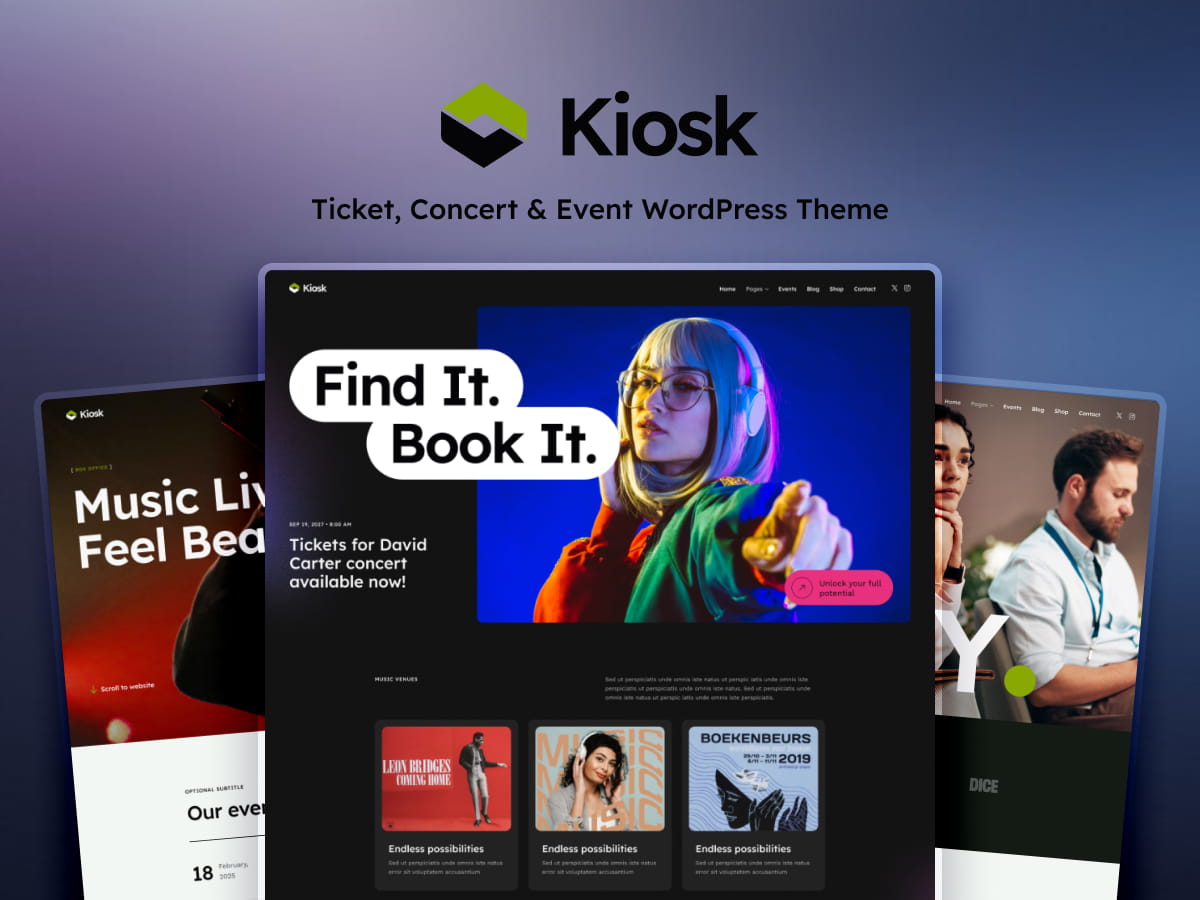
Kiosk is an impressive WordPress theme designed specifically for concert and event websites. At an affordable price of just $7, it offers a comprehensive solution for anyone looking to create a professional online presence for their concert events. The theme is compatible with WordPress 7+ and Elementor V4, ensuring you have access to the latest features and functionalities. Whether you’re an event organizer, a concert promoter, or a freelancer working with clients, Kiosk provides the tools you need to manage and promote events effectively.
What Makes Kiosk Stand Out as a Concert Event Theme?
Kiosk distinguishes itself with a suite of powerful features tailored for the concert and event industry. The theme integrates seamlessly with Elementor, allowing users to customize their website layout with ease. Elementor’s drag-and-drop functionality empowers users to create unique designs without needing any coding skills. Additionally, Kiosk supports WooCommerce, Events Calendar, and Events Tickets, making it a robust platform for managing ticket sales and event scheduling. These integrations ensure that all aspects of event management are covered, from promotion to ticketing and logistics.
How Does Kiosk Integrate with WooCommerce and Events Calendar?
One of Kiosk’s key strengths is its integration with WooCommerce, a leading e-commerce platform. This integration enables you to sell tickets directly from your website, providing a smooth purchasing experience for attendees. The Events Calendar feature allows you to schedule and display events in a user-friendly format, making it easy for visitors to see what’s coming up. These tools work together to streamline the event management process, benefiting both organizers and attendees by making ticket purchases and event information readily accessible.
Is Kiosk Easy to Customize with Elementor?
For those concerned about customization, Kiosk offers extensive flexibility with Elementor’s drag-and-drop capabilities. The theme includes a variety of pre-made templates that can serve as a foundation for your design. Non-developers will appreciate the user-friendly interface, which allows for easy personalization without needing to write code. You can adjust layouts, colors, fonts, and more to ensure your site aligns with your brand’s identity.
Can Kiosk Handle High Traffic and Large Events?
Kiosk is designed to perform well under the pressure of high-traffic events. It supports scalability, ensuring your website can handle increased demand as your event grows. When considering hosting options, it’s crucial to choose a provider that can support your website’s needs. For more insights on scalability and hosting, read our article on What Happens When a Premium Website Runs on Weak Hosting. Moreover, Kiosk includes built-in optimization features to enhance performance, ensuring fast load times and a smooth user experience.
What Are the Best Use Cases for the Kiosk Theme?
Kiosk is ideal for concert promoters, event organizers, and music festivals looking to establish a professional online presence. Its features make it a valuable tool for freelancers and web studios working on client projects in the entertainment industry. A successful implementation example includes a music festival that utilized Kiosk to manage ticket sales and event schedules, significantly improving their online engagement and ticket sales.
How to Get Started with Kiosk: A Step-by-Step Guide
Getting started with Kiosk is straightforward. Follow these steps:
Purchase and download the theme from the official source URL.
Install the theme on your WordPress site by navigating to Appearance > Themes and uploading the downloaded file.
Activate the theme and follow the setup wizard for initial configuration.
Explore the customization options within Elementor to personalize your site.
Utilize the pre-made templates to quickly build your pages.
FAQ: Common Questions About the Kiosk Theme
Is Kiosk suitable for non-concert events? Yes, while optimized for concerts, it can be adapted for various event types.
Can I integrate other plugins with Kiosk? Yes, Kiosk is compatible with most third-party plugins.
What support does ThemeREX offer for this theme? ThemeREX provides robust support, including documentation and customer service.
How often is Kiosk updated? Regular updates ensure compatibility with the latest WordPress versions.
Is there a demo content import option? Yes, you can import demo content to get started quickly.
How user-friendly is Kiosk for beginners? Kiosk is designed with beginners in mind, offering intuitive tools and support.
Conclusion: Is Kiosk the Right Theme for Your Event Website?
Kiosk offers an array of features that make it an excellent choice for concert and event websites. Its integration with Elementor, WooCommerce, and Events Calendar provides a comprehensive toolset for event management. Whether you’re organizing a small local concert or a large music festival, Kiosk is equipped to handle your needs. If you’re ready to take your event website to the next level, consider purchasing Kiosk today.