



Looking for the best web hosting for WordPress site? We certainly can help you choose one.
Here at ThemeREX, we create the best WordPress Themes & Website Templates. In 2024 we sold 100,000+ copies of our WP Templates. Therefore, we have customers literally in each country. Hence, we had a chance to work with hundreds & hundreds of web hosting companies for WordPress, if not all.
The Best Dedicated Servers offer the power, security, and control required to host WordPress sites that need high performance, customization, and robust protection. For businesses or developers aiming to provide the best user experience in 2025, dedicated servers are a key investment in reliable, high-quality web hosting.
The article has been updated on 31 Jan 2025.
What is Web Hosting?
Web Hosting is an internet service that allows one to place the websites on remote web servers and make them accessible via the World Wide Web. Web Hosting Companies (web hosts) provide space on their servers and data centers and are responsible for constant connectivity.
Simply put, they provide a space on their server for rent. Companies and individuals can rent this space to post their websites on the internet. Also, web hosts make sure that sites are available online 24/7. Internet users can type the website address (domain name) and they will get connected to the server where your site is located.
What Are the Main Types of Web Hosting?
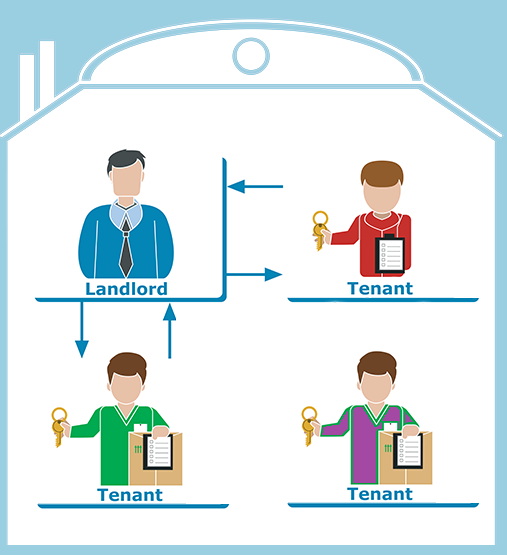
It’s very similar to how people share an apartment. Usually, it’s cheaper than renting an entire apartment by yourself. But when you get more and more roommates it’s getting tight and sometimes you have to wait to get to the shower or cannot bring guests.
Reseller Hosting – is when the users that rent a server become the web hosts themselves. For example, they can rent 50GB server space, split it into 5 pieces by 10GB each and sell them to 5 different clients. This way users can even earn money.
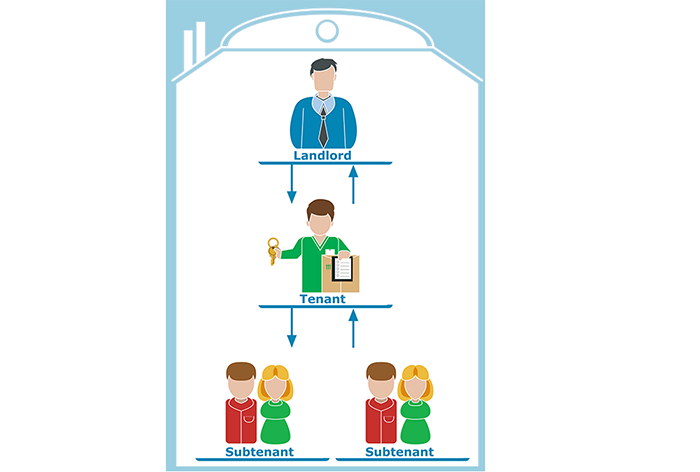
Again it’s very similar to the case when people rent, for example, a 3 bedroom apartment and then give it for a sublease to 3 other people.
Virtual Dedicated Server / Virtual Private Server (VPS) – is the type of server shared between several users where each user can install his/her software. It’s more secure than a regular shared hosting but still, users share the same hardware and server capacity.
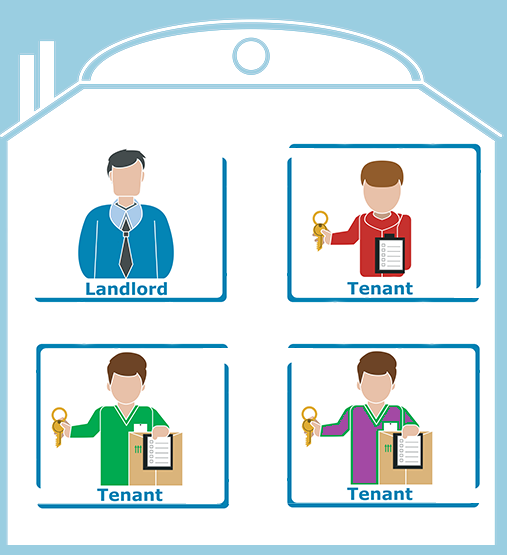
If we take an apartment analogy it’s when you share the same flat with your roommate, but there is a dividing wall, you have your own entrance door, windows, kitchen etc… But you share water supply system and electricity. So, if your roommate goes to his/her shower the pressure in your pipes may be slightly lower.
Dedicated Hosting (Server) – is a web hosting service when the user gets an entire server not shared with anyone else. The user has full control over the hosting server including Software and Hardware.
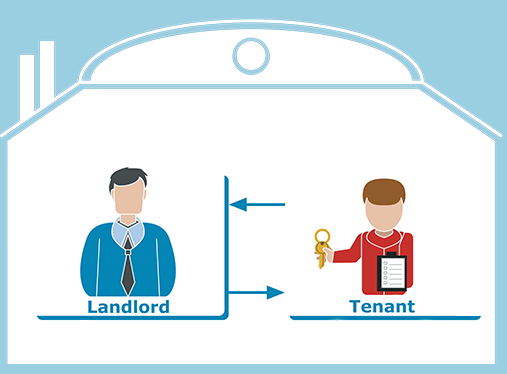
It’s when you rent an entire house by yourself and have an option to make a complete renovation: change colors, floor, windows, walls etc…
Cloud Hosting (Cloud Computing) – is the type of web hosting when the site is hosted on multiple remote servers. This helps to reduce downtime and overloads. For example, in case one of the remote servers fails the other server will replace it. Also, if there are plenty of visitors on site the cloud hosting will enable additional servers to maintain the website.

Let’s try to imagine your house with guests. Although, you’ve prepared dinner for 5 persons you see 10 persons entered your house. But don’t worry at all. Your “Smart Cloud Hosting House” makes your table longer and adds more food automatically. Moreover, in case of kids break anything (TV or your favorite vase) the house will replace it instantly. No one will notice anything.
Home Server – is the web server located in a private residence built for a home network or for the internet. Due to a significant amount of required efforts, knowledge and time, people use this type less than the other types.
It’s like you build the house yourself. If you are a building engineer and have plenty of time then it may make sense.
Free Web Hosting or Paid Web Hosting?

Except for the fact that “free is free” the #1 choice is definitely – Paid Hosting. But let’s still compare them.
- Price. It’s quite an obvious advantage of the free hosting. However, keep in mind that free server providers will do their best to sell you paid account by limiting your tools, resources, sending you ads, spam etc. On the other hand, the Paid Hosting right now is quite affordable and will cost a few bucks per month.
- Security. First of all, free web hosting does not provide an SSL (Secure Sockets Layer) option. It’s the encrypted secured connection between a web server and a browser. Other words, it’s when the site name starts with https. Second of all, the free hosting doesn’t guarantee any hack or scam protection and will not provide you with backups in case anything happens.
- Liability. Free web hosters don’t guarantee any stability. Why would they? Also, there is always a chance that they will simply close your account due to server overload or free program cancellation. This, however, will not happen with the paid servers since if they let the customers down they will lose them.
- No Support. Even though there are plenty of educational articles and videos on the net, you still may need some support. Especially if you just begin working with the web hosting servers. Obviously, the free hosting provider will not provide you with support. So, you will have to figure everything out yourself.
- Domain. Did you know that the free hosting service will not allow you your own domain name? All you get is a subdomain. For instance, their domain name is example.com. Hence, your site link will be yoursite.example.com. If you start your company site or personal blog it ruins your professional appearance. Any paid hosting will give you an option to set your own domain name.
- Limits. The free hosting company limits their users by certain parameters: number of visitors per day, the quantity of executed scripts, disc space etc. Also, they limit the visitors by services and features. At some point, most of the users face server limits that don’t allow to continue a project. Far not always they are aware of them. You may face the server limits on paid shared hosting, but you will definitely know what you can and what you can’t do beforehand.
- Ads on your page. This is the most frustrating one. Quite often when you build your site on the free server they will add their advertising somewhere on your page. You can’t control it. It’s just how they earn money.
- SEO. Search Engine Optimization is one of the weakest sides of free hosting. Due to the fact that your site is on a subdomain, the server speed is very low and script execution is limited Google and other search engines will give your page a very low rank.
Why people still use free hosting?
Free hosting is good for testing and learning. Many of those who start learning web programming and web administration create free hosting accounts for educational purposes. Also, it is ok for temporary sites. For other cases, it doesn’t fit.
What is WordPress Hosting?
WordPress Hosting is the type of hosting services optimized for WordPress website. It includes security, performance, 1-click installation, update, specific control panel, and additional features.
However, it doesn’t mean that if you plan to build a WordPress site you should necessarily buy a WordPress hosting. In fact, the WP CMS modern requirements are insignificant. Hence, you can install WordPress literally on every paid hosting. Although, when it comes to using powerful WordPress Themes and Functional Plugins you can face some issues.
So, here are some features of WordPress Hosting:
- Interface optimized for WordPress user.
- Optimized server performance.
- Security & Backups of your WP site.
- Automatic engine & plugin updates.
- Additional services like caching, 3rd party services synchronization etc.
- You pay for the resources needed for your WP site (no more).
As it was mentioned before you can choose any WordPress hosting type: shared, VPS or dedicated server. Although, if you pick the cheapest shared one you may face some site speed issues or disk space exhaustion. And vice versa if you buy an expensive server there is a chance that you pay for resources you will never use. So, it really makes sense to go with the WordPress Hosting for your future site.
How to Choose the Best Web Hosting Provider?
Though it’s quite obvious but it’s important to emphasize that choosing the right hosting provider is crucial for your future website. You should be confident that you will always have access to the site and server support if you have an urgent question.
When you choose the web hosting provider you need to take into the account plenty of factors. Let’s check the most important ones:
- Security. Safety comes first. A good hosting company provides tools for your site protection.
- Speed. An average customer waits no more than 3 seconds while your site is loading. If the site loads slowly he/she will leave. Especially if we speak about mobile devices. Moreover, low site speed reduces your SEO significantly.
- Convenience. You should feel comfortable using hosting services. The interface has to be convenient and understandable. You don’t want to waste your time figuring out the internal hosting panel arrangement.
- Support. We’ve been in web design & development for 10+ years now. So, we can call ourselves experienced web users. However, there are issues & projects occur that we have to resolve with the hosting company all the time. The hosting provider has to be available 24/7. Furthermore, they must have at least 3 support channels, for example, email, phone, live chat. Not always you will be able to write an email or call them.
- Services. Even if you need just a small amount of services, in the beginning, you may need some additional or special services in the future. So, never choose the website hosting that provides only certain limited amount of services. When/if you need something extra – you will be in a trap.
- Price. Obviously, nobody wants to pay more for the exact same thing that costs less somewhere else. An important question is whether the hosting plans you compare have the same features.
3 Best WordPress Web Hosting Providers
We are not going to waste your time with Top-20 or Top-30 lists of the best hosting providers. Who would need the hoster #18 if there is #1 available at the same price? Here we will provide you with the list of TOP 3 equally great web hosting companies that are also perfect for your WordPress site. This list was longer in the past, but we left only the best and those that never let us (and our customers) down.
Depending on the criteria importance each of them can be #1. However, at the end of the paragraph, I’ll give you my personal favorite one.
BlueHost

You will definitely find BlueHost literally in all the Hosting rankings whether it’s a WordPress hosting Ranking or Dedicated Servers ranking.
This hosting provider currently serves 2+ million sites worldwide. It is well known as one of the best inexpensive shared hosting services. With its 750+ employees team BlueHost is in Top-20 best web hosting for WordPresslargest web hosting companies in the world.
Let’s see why people choose BlueHost.
Pros of BlueHost
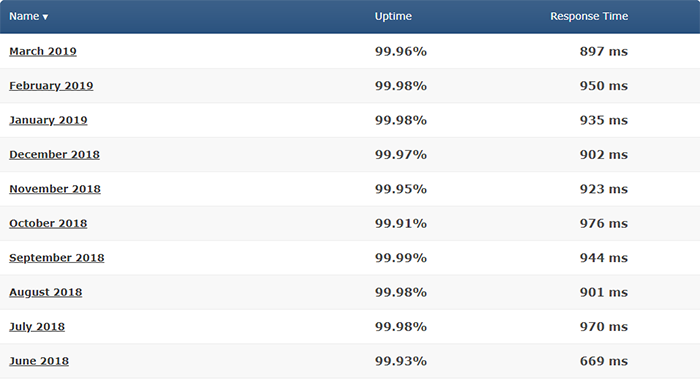
- Guaranteed uptime 99.99% and Fast Speed. Here are BlueHost uptime testing results for the past 10 months:
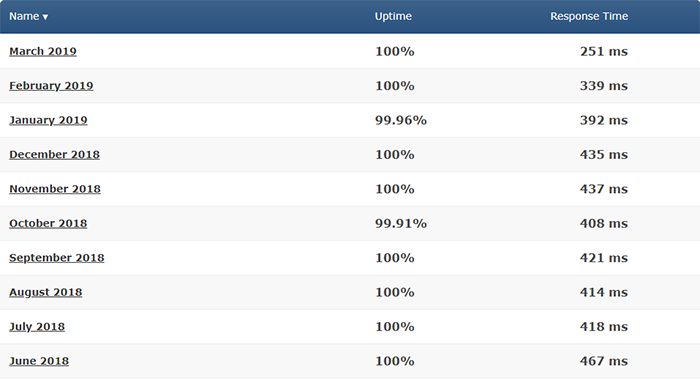
As we can see the numbers are impressive, the server is always up and running and the response time is super fast.
- Officially Recommended by WordPress.org. When you choose the best WordPress Hosting it will be smart to choose the one that is recommended by WordPress itself.
- User-Friendly. When it comes to the user experience BlueHost wins all the prices. Let’s check their Hosting Panel.
When you log in you can see your Dashboard with 1 click WP Installation, your site info, and useful links:
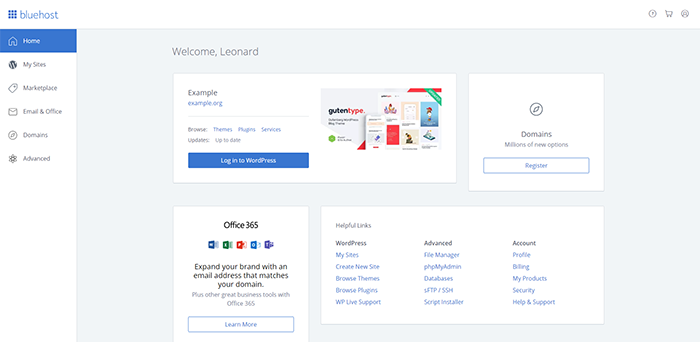
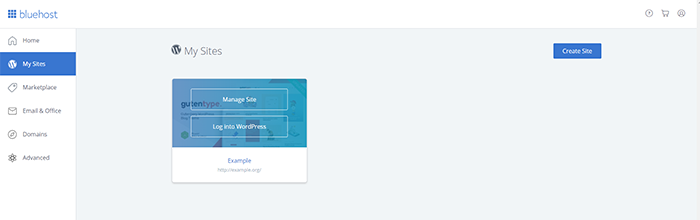
In “My Sites” Section you can create and manage your websites. Also, you can log in directly to your site:
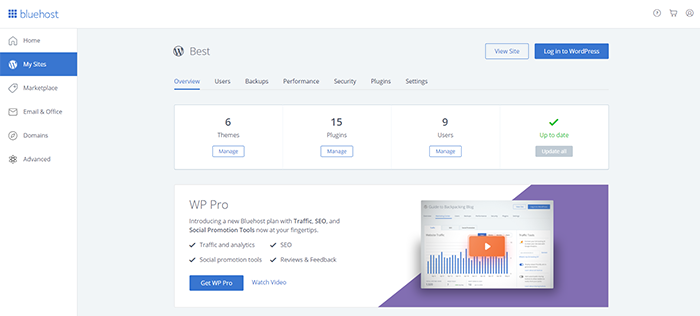
If you click “Manage” you will get access to all the possible data and settings of the particular site:
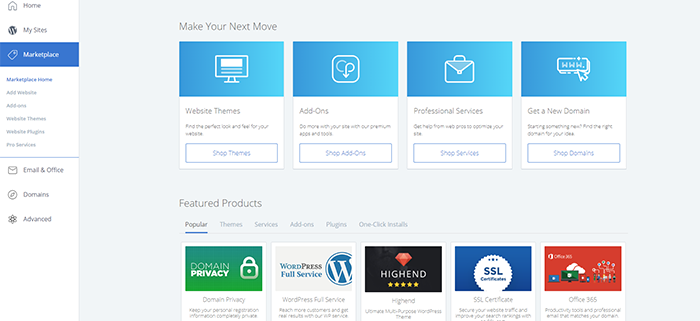
In “Marketplace” Section you can order additional WP Themes, Add-ons, Automations, Integrations, and Services:
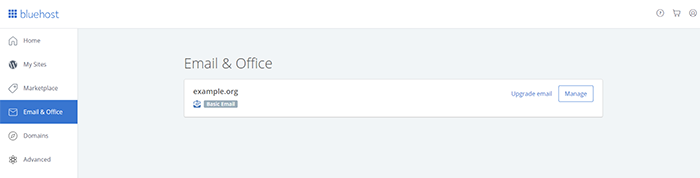
“Email & Office” tab is the place where you can set and manage your email settings:
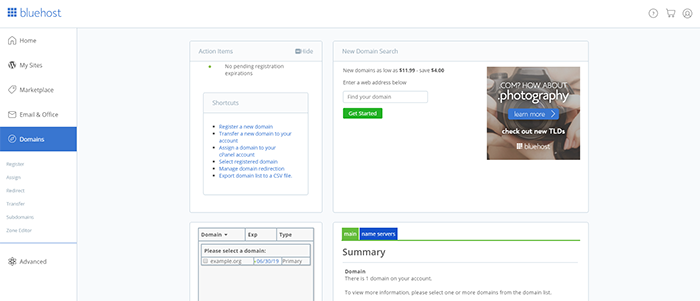
In “Domains” you are able to add/remove/transfer domains and subdomains, set redirects and name servers:
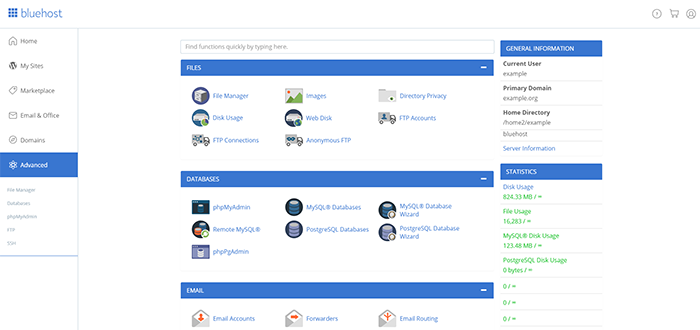
And “Advanced” settings will allow you to work with a Control Panel, Files, Databases and much more:
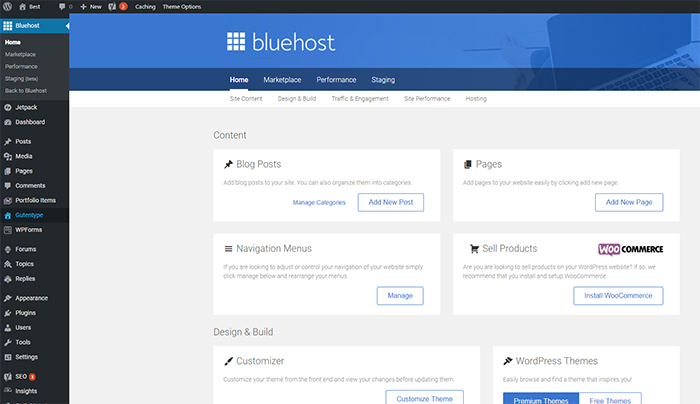
- Built-in WordPress Utilities & Security. When you first log in to your WP Dashboard you will notice that there are several tools added for free: BlueHost menu with the Stats, Performance and additional features menu. Also, you get a free JetPack:
- Quick Support. Besides the regular Customer Care team BlueHost has a dedicated WordPress support team that is available 24/7 via email, phone & live chat. This is quite convenient, especially if you need urgent help.
- Great intro pricing & 30 days money back guarantee. You can get your hosting from $3.95/mo (in case you buy a several years subscription) which is quite affordable for the level of services you receive. Also, the company guarantees that if you decide to cancel your subscription you will get a full refund for the hosting services (but not a domain).
Cons of BlueHost
- Short-Term & Renewal Price. Even though the intro price for long-term services is very attractive, the cost of yearly subscription and renewal price is a bit higher.
- The customer care services are only in English, as well as the BlueHost Control Panel. It can be quite inconvenient for non-English speakers.
- No Refunds for Domain services. BlueHost doesn’t refund for domain services you purchase from them. Even if you buy a hosting plan where the domain is “free” – in case of an account cancellation the refund amount will be less for a domain cost.
- Even though the support is super fast for some reason they are not always attentive to the exact questions you ask. Therefore, sometimes you have to rephrase your question to get it resolved faster.
InMotion Hosting

InMotionHosting is one more USA-based giant in Web hosting services. Their primary goal is delivering ultra professional customer care. Ex company workers stated that they had 160+ hours of special training before they actually got to the customer service department. No wonder they have A+ on BBB.
InMotionHosting currently serves 300,000+ active websites with the company staff of 300+ employees.
Let’s see why people choose this hosting provider.
- Good Uptime 99.98% & Speed. Here are InMotion Hosting uptime testing results for the past 10 months:
- Special Prices & Discounts. The company does a great job for their loyal customers. They offer special prices to keep clients with them. Moreover, there is a chance to negotiate some good conditions for your account. Therefore, if you see that the pricing is a bit higher than you expected, go ahead and try to ask for a custom pricing in their support chat.
- 90 days money back guarantee. Indeed, you have 3 months to test the hosting services (for Business, Reseller & VPS plans). It is fairly more than enough. Although, for shared hosting you still have a standard 30 days.
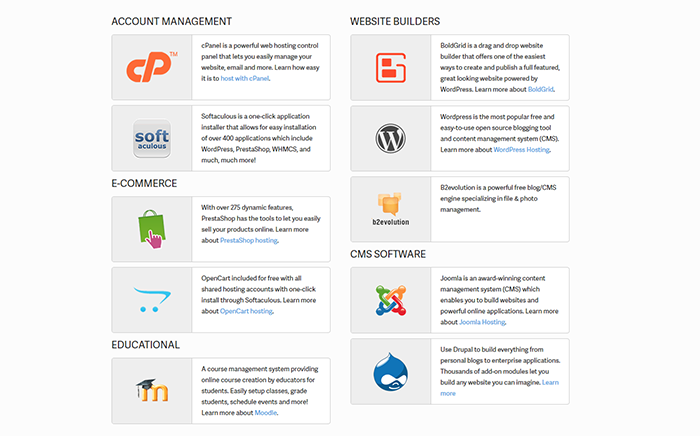
- Integrations. When it comes to integrations InmotionHosting is the world’s champion. They guarantee compatibility with 300+ applications and Open Source projects.
- Security. That’s where the InMotionHosting did a really great job.
First of all, specifically for WordPress users, the hosting comes with the Sucuri WP Plugin. It scans your sites on regular bases and reveals the security risks.
Second of all, the system provides remote backups, anti-spam, and anti-virus protection.
Third of all, InMotion Hosting offers a Smartwall Threat Defense System (TDS). It detects, mitigates, and eliminates DDoS attacks in real time. Currently, it’s the most advanced security system on the market.
Above all, InMotion Hosting provides free SSL (for the sites on https) & SSH access (even in the cheapest plan).
- Services. Let’s see what InMotion Hosting provides in terms of services. When you log in to your hosting account you will see the following options:
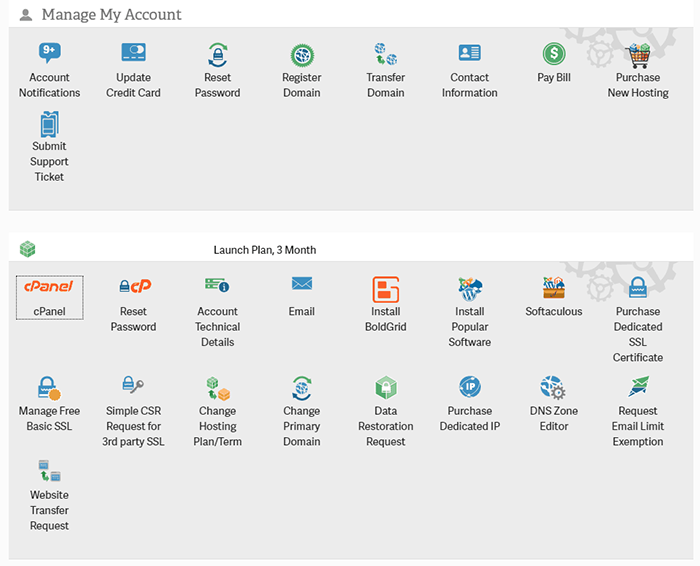
So, you can manage your account settings and billing information, manage your domains & order new services. Furthermore, they offer a BoldGrid installation that helps with your site customization. Also, here you have your Control Panel settings, Email, Integrations, manage SSL Certificates and request website transfer.
When you log in to your Control Panel you will see the following:
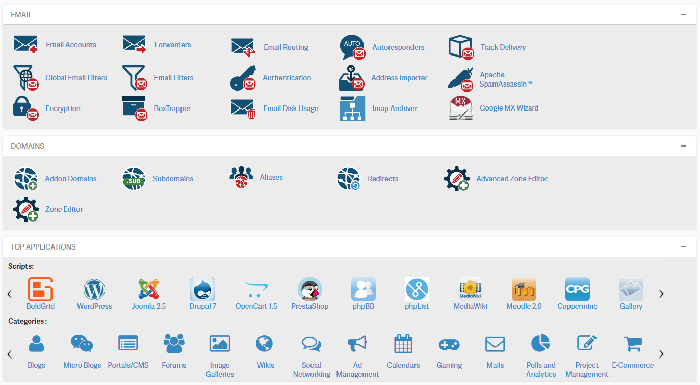
We can see the usual CPanel sections: Preferences, Email, Domains, Applications, Software, Files, Databases, Metrics, Security and Advanced. However, they also added a nice stats of your site usage, multi-application installer, poly-database options (you can choose the types of your databases) and SSH access (even on shared plans).
When you log in to your WordPress Panel and edit the page with BoldGrid page builder you will see this:
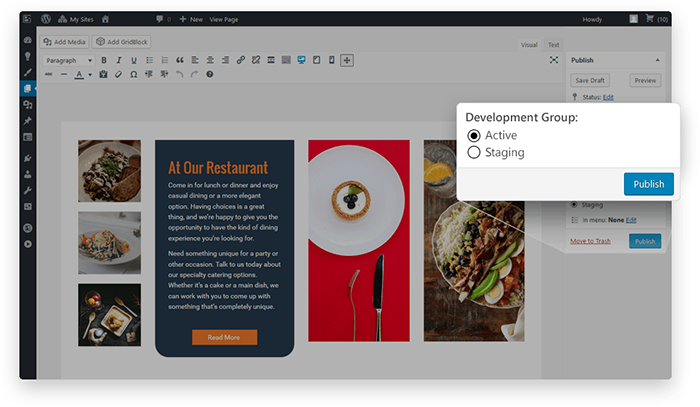
Even though we like Elementor more, this builder has it’s pros as well.
- Support. Most of the clients that had a chance to contact the InMotion customer service admitted that it’s very friendly, professional, fast and eager to help. Indeed, it’s a very strong part of the company. They guarantee free 24/7/365 customer care. Also, they have one of the best ratings on BBB: A+. Above all, they’ve prepared and arranged an absolutely incredible knowledge base. It has articles and tutorials literally for any question you may have.
So they are going above and beyond to help their customers.
Cons of InMotion Hosting
- Even though the site speed & uptime is better than average on the web hosting market they still could’ve been a bit better. Also, they don’t guarantee the 100% uptime in case you migrate your site. Though it’s not a big issue for 1-time migration, but some hosting companies still provide this option.
- Intro Price is a bit higher than, for example, provided by BlueHost. However, we have to keep in mind all the additional services and security measures they provide additionally. And don’t forget about the special pricing they can provide you.
- Most of their data centers are located in the USA. It’s a great benefit for US, Canada & Mexico but the visitors from other continents may have lower site load speed.
SiteGround Hosting

SiteGround is on the web hosting market since 2004. This provider currently serves 1.8+ million sites worldwide. It is known as one of the best cheap hosting services. Not only it shows good numbers in speed & uptime, but it also provides useful additional services.
With its 500+ employees team, SiteGround is in Top-20 largest best web hosting for WordPressweb hosting companies in the world.
Let’s see why people choose SiteGround.
Pros of SiteGround Hosting
- High Uptime & Good Speed. Here are SiteGround’s speed test and downtime results:
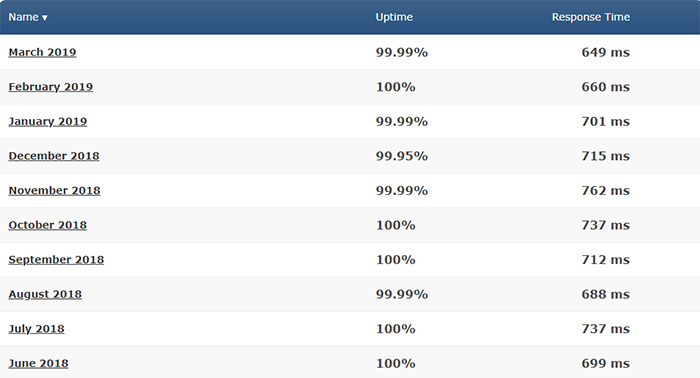
Clearly, the numbers are pretty good. And here is how they’ve reached them:
- They have data centers in different countries: Chicago (USA), London (United Kingdom), Amsterdam (Netherlands), Singapore (Singapore).
- Linux Containers based server platform that provides good stability.
- Also, SiteGround built an automated server monitoring system that reveals and fixes the issues on servers and prevents downtimes and speed drops.
- Here is some info for advanced users: they provide NGINX-based caching, SSD-drives, PHP 7, CDN and HTTP/2.
- Officially Recommended by WordPress.org. If you’re planning to build a WordPress site it will be wise to choose the one that WordPress recommends itself.
- Datacenters. As it was mentioned before the SiteGround hosting has data centers in different countries: Chicago (US), London (UK), Amsterdam (NL), Singapore (SG). It means that you can host your site on the closest server to ensure a better speed. It’s a big advantage
- Services. When you log in to your Siteground hosting account you will see the following page:
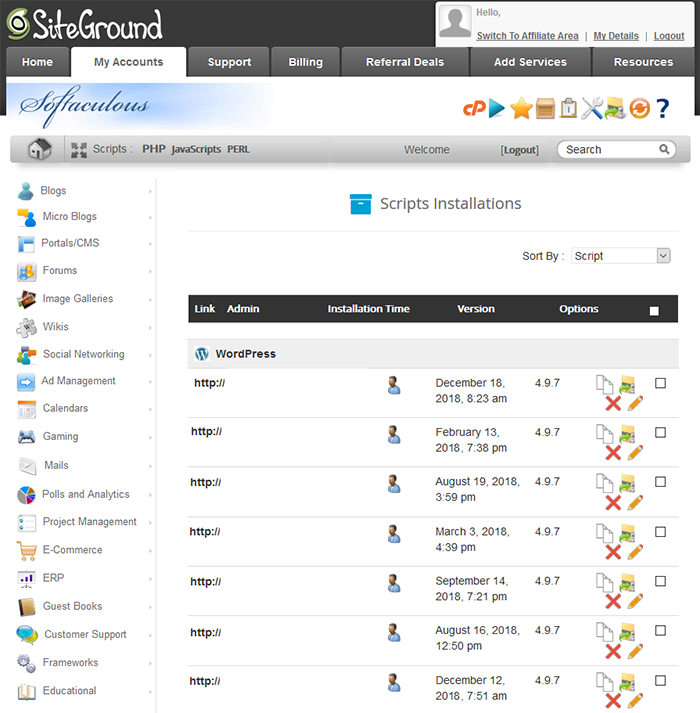
As you can see it looks quite different from the other hosters. However, it is still understandable and convenient. You have sections: My Account (with most of the important settings), Support (here you can get assistance), Billing (managing payment info), Referral Deals (you can earn $ for promoting the hosting), Add Services (here you can order additional services).
When you log in to your Control Panel you will see a very familiar dashboard with the CPanel features and settings.
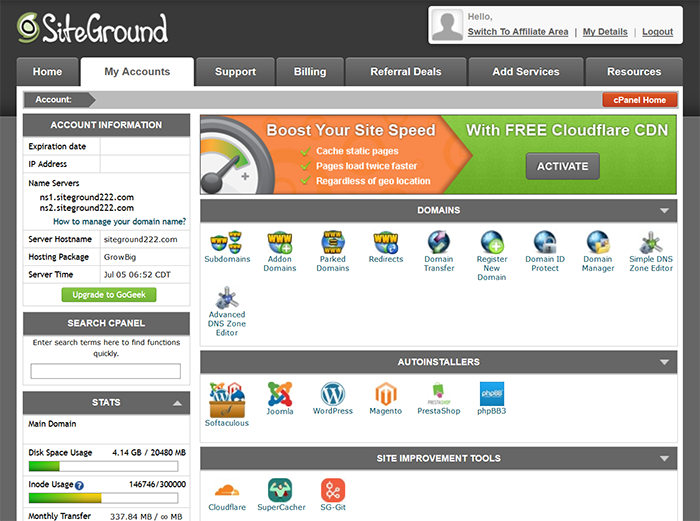
Here you can use the one-click WordPress install option, set managed updates & SSL Certificate, CloudFlare, SuperCache and SG-Git.
When you log in to your WordPress Panel you will notice that it has additional options with JetPack and CG Cache Optimizer for better performance.
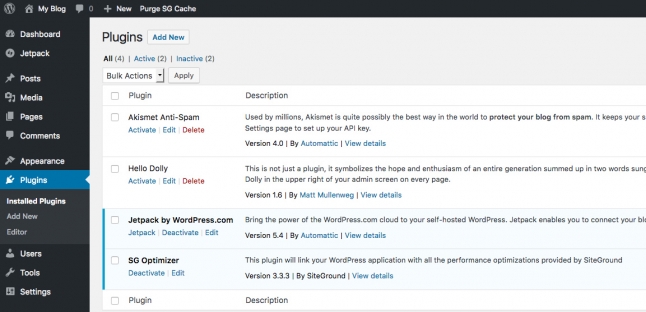
- Support. We have to admit that SiteGround Hosting has very detailed documentation and knowledge base. In fact, you can find any info about their services and WordPress CMS management in their tutorials.
Above all, they provide professional Customer Support via email and chat with good response time.
- Security. The company does a great job in the security section. They provide free LetsEncrypt SSL certificate. Also, they’ve created an account isolation technology for client security. Therefore, even on shared hosting plans, you will not be hurt by other users whatsoever.
Furthermore, web hosting provides free automatic daily backups, access to the Cloudflare CDN.
Moreover, they have a specially dedicated team for WordPress sites that create security plugins, patches and constantly improve them.
- Price. Pricing policy is very similar to other hosting companies. Their minimal package is $3.99/mo if you order the hosting for 1+ year. If you want to pay monthly you will be charged a one-time $15 setup fee. So, it doesn’t really make much sense since they still offer 30 days money back guarantee.
Cons of SiteGround Hosting
- This web hoster has disk space limits. It means that in case you plan to build a heavy large website with plenty of media files you need to choose the right hosting plan. Though, the upgrade process is pretty simple.
- Above mentioned $15 Setup fees for monthly payments. We understand that they are trying to motivate users to purchase long-term plans. But it feels like there are better options for marketing. For example, give customers only 10 months monthly payments and then offer to move to annual plans.
bodHOST – Managed WordPress Hosting
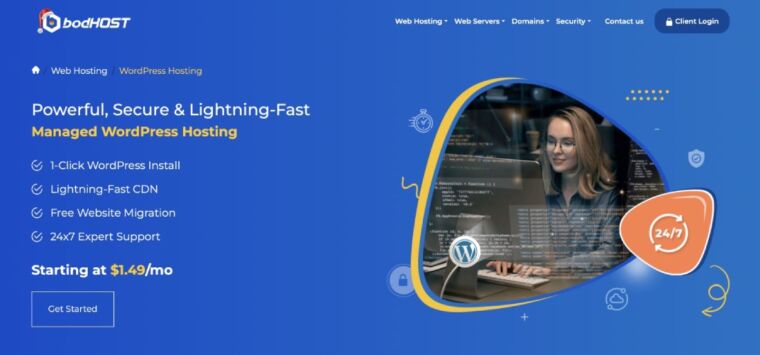
bodHOST delivers a managed WordPress hosting experience designed for users who want simplicity, speed, and reliability without dealing with technical upkeep. From one-click installation to automated maintenance, bodHOST provides an optimized environment that allows beginners, bloggers, freelancers, and small business owners to launch and grow their WordPress sites effortlessly.
Their hosting uses SSD storage, LiteSpeed-ready servers, and global CDN support to ensure smooth performance and fast load times. Daily backups, automatic WordPress updates, and built-in security make sure your site stays protected and running smoothly. With flexible plans ranging from a basic single-site package to multi-site options bodHOST makes it easy to scale as your website grows.
The Starter plan is ideal for small websites with one WordPress installation and 5 GB SSD storage, while higher-tier plans offer more websites, additional storage, and higher performance resources for increasing traffic. You also get an easy-to-use control panel, email accounts, free website migration, and a free domain on many plans.
Pros
- Easy one-click setup and automatic updates
- Fast performance with SSD storage and optimized servers
- Free site migration
- Flexible single-site and multi-site plan options
- Reliable 99.9% uptime and 24/7 expert support
- Free first-year domain on many plans
Cons
- Starter plan includes limited storage
- Advanced features are available only in higher plans
MilesWeb Hosting

MilesWeb delivers blazing fast speed, strong performance and assistance required to keep your WordPress site smoothly going.
Based on a powerful infrastructure, MilesWeb WordPress hosting is designed for reliability, scalability and security.
Theirpackages are loaded full of enticing features- an SSL certificate, no-cost migration, free domain name, SSD disk storage, automatic WordPress updates and tons more.
Oh, and of course they give a convenient money-back policy for 30 days.
Let’s see why people choose MilesWeb.
Pros of MilesWeb Hosting
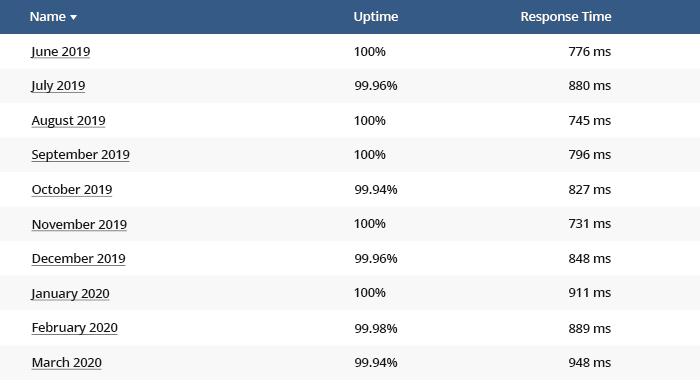
Great uptime 99.95% & Speed. Here are MilesWeb Hosting uptime testing results for the past 10 months:
- 24/7 Support: Their technical team provides assistance through multiple contact platforms such as e-mail and live chat. You will have to wait for less than a minute for their executive professionals to communicate with you and they will reply promptly and in detail to any of your WordPress questions.
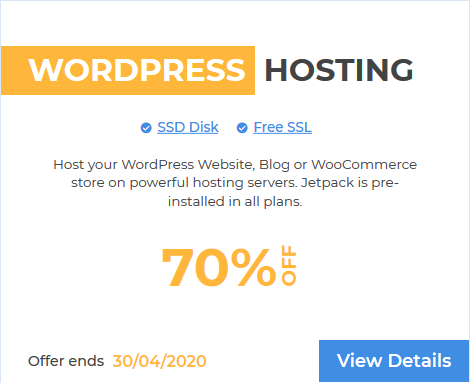
- Great Deals: Leaving no scope of negotiation, MilesWeb offers exclusive deals for its customers. Currently, they offer a 70% discount on their WordPress hosting plans. This makes the cost of the plan as low as $1.
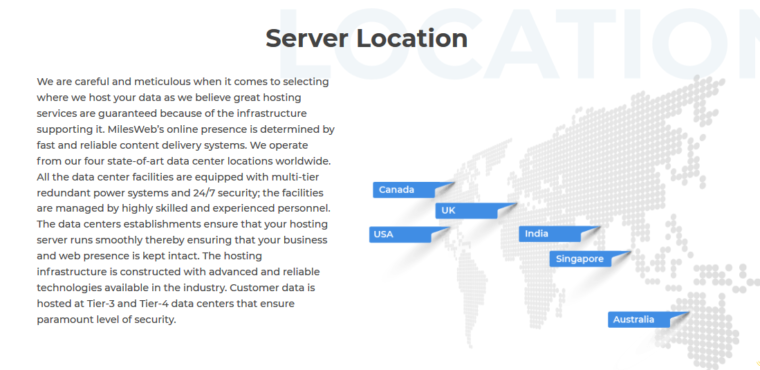
- Datacenter Choice: Selecting the datacenter location nearer to the area your target visitors live in will serve great benefits. MilesWeb lets you pick the data center from the various data center options closer to your target audience.
- Developer-friendly tools: They have designed their hosting plans with some exceptional WordPress hosting features such as Cloudflare Railgun, GZIP/Brotli Compression,WP-CL, CDN, Cloning, Caching, etc. All of these together help in boosting the performance of your WordPress website.
- Updates Management:You don’t need to manually search and activate the updateson your WordPress platform. The software at the backendof your site runs dynamically to updates WordPress to the latest one. This includes updates of WordPress platform, plugins as well as other site-specific updates.
Cons of MilesWeb
- No Phone Support: MilesWeb has discontinued its telephone support for its customers. The reason we got to know is that they believe when it’s about discussing technical queries gathering technical information via chat and email is much easier than on telephonic conversation. As written log, error screenshots, past issues can be more conveniently sent via chat or email. This helps their team to resolve the technical issues quickly.
EasyWP
As a blogger or website owner, choosing the right web hosting provider is critical to the success of your online presence. One such option is EasyWP Managed WordPress Hosting by Namecheap. It is an affordable, easy-to-use hosting solution that promises fast loading times and automatic updates.
Pros of Using EasyWP Managed WordPress Hosting
- Easy Setup and Installation
One of the biggest pros of using EasyWP Managed WordPress Hosting is its easy setup and installation process. Compared to some web hosting providers, EasyWP requires no technical knowledge to get started. The process is straightforward; you can have your WordPress site up and running in minutes. You can also migrate your existing WordPress site to EasyWP, and the Namecheap team will handle the process for you.
- Fast Page Loading Speeds
Page loading speed is vital for any website, and EasyWP Managed WordPress Hosting promises impressive speeds. The hosting provider uses the latest technology to ensure that your website loads quickly, which can improve your search engine rankings and user experience. Additionally, EasyWP uses a content delivery network (CDN) that helps distribute your website’s content across multiple servers, making it faster for users to access your website from different locations worldwide.
- Automatic Backups and Updates
EasyWP Managed WordPress Hosting offers automatic backups and updates, which is a significant advantage for website owners who don’t have the time or technical knowledge to do it themselves. The hosting provider takes daily backups of your website, allowing you to restore your site to a previous version if anything goes wrong. Additionally, EasyWP takes care of all WordPress updates, ensuring that your site is always running on the latest version of WordPress, which can improve site security and performance.
- Affordable Pricing
EasyWP Managed WordPress Hosting is an affordable hosting solution, making it ideal for bloggers and small business owners on a budget. There are three pricing plans available, starting at just $3.88 per month, which includes hosting for one website, 10GB of storage, and 50,000 monthly visitors. The mid-tier plan costs $7.88 per month, which includes hosting for up to three websites, 20GB of storage, and 200,000 monthly visitors. The top-tier plan is $11.88 per month, which includes hosting for up to ten websites, 50GB of storage, and 500,000 monthly visitors.
Cons of Using EasyWP Managed WordPress Hosting
- Limited Control Over Server Resources
EasyWP Managed WordPress Hosting is a shared hosting solution, meaning you share server resources with other website owners. While this isn’t necessarily a bad thing, it does mean that you have limited control over your server resources. If another website on the same server is using a lot of resources, it could affect the performance of your website. Additionally, if your website starts to receive a lot of traffic, you may need to upgrade to a higher-priced plan to ensure that your website can handle the traffic.
- No Email Hosting Included
Another disadvantage of EasyWP Managed WordPress Hosting is that email hosting is not included. To set up email accounts with your domain name, you must use a separate email hosting subscription. While this may not be a problem for some website owners, it can inconvenience others who want an all-in-one hosting solution.
Conclusion: Is EasyWP Managed WordPress Hosting Right for You?
In conclusion, EasyWP Managed WordPress Hosting is an affordable, easy-to-use hosting solution that promises fast loading times and automatic updates. It is ideal for bloggers and small business owners on a budget who want a hassle-free hosting solution. However, it may not be suitable for advanced users who need full access to server resources or want to customize their server settings. If you’re looking for a simple, affordable hosting solution that takes care of backups and updates for you, EasyWP Managed WordPress Hosting is worth considering.
Hosting Comparison Table
| Criteria | BlueHost | InMotionHosting | SiteGround |
| UpTime | 10/10 | 8/10 | 9/10 |
| Speed | 10/10 | 8/10 | 9/10 |
| Price | 9/10 | 9/10 | 9/10 |
| Services | 10/10 | 10/10 | 10/10 |
| Support | 9/10 | 10/10 | 10/10 |
| 1-Click WP Installation | ✔️ | ✔️ | ✔️ |
| Money Back | 8/10 | 10/10 | 8/10 |
| Security | 10/10 | 10/10 | 10/10 |
| Integrations | 9/10 | 10/10 | 9/10 |
So, as you can see these 3 hosting providers are very close in their key parameters. Thus, pick the one you like the most taking into the account that each of them provides 30+ days money back guarantee.
Keep in mind that there is no absolutely perfect server provider. There always will be situations when you have to request assistance from your hosting. This world is not perfect.
And as I promised before, my favourite hosting service is BlueHost. Despite some cons, the company assures one of the best site speed and uptime on the market. It is getting more and more important for Bloggers, Content marketers and SEO projects that try to rank higher in Google.

What is the Best Web Hosting for a Small Business or Small Blog?
If you are looking for a web hosting for your small project (your company page, blog or portfolio) you definitely don’t need an expensive provider. Especially, if your main marketing channel is social media, YouTube or offline arrangements.
However, we need to keep in mind that one day your website can become your primary source of sales. And you may require additional features, services, and web hosting resources. Therefore, we strongly recommend using a good hosting provider from the very beginning.
So, you need a basic plan from a reliable web hosting company. If you don’t have a domain name yet you should be able to get one from this provider. Also, you need the hoster that will help you upgrade your server in case you need additional resources. When your business grows big you may want to move from the shared hosting to the dedicated server. The hosting provider must have this option for you.
Just in case something goes wrong or you change your mind, you want to have a chance to cancel your subscription.
AccuWeb Hosting also offers optimized WordPress hosting with fast performance, robust security, and easy scalability. With features like free site migration, automatic updates, and 24/7 support, it provides a seamless experience for WordPress users looking for reliable and efficient hosting solutions.
Therefore, we recommend choosing between BlueHost, InMotion Hosting or Siteground Hosting.
AccuWebHosting covers all these requirements.

How to Start Your Own Site from Scratch?
We will give you a step-by-step guide how to start your own WordPress Site.
- Choose the Domain name – it’s the name of your website and the address where Internet visitors can find your site. Here is a detailed step-by-step guide on how to choose the domain name.
- Pick your Hosting provider. Just use this article and choose among recommended hosting companies.
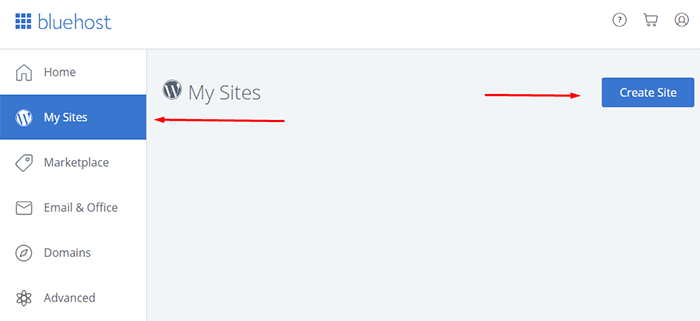
- Install WordPress. Above mentioned hosting companies provide easy WordPress installation settings. For example on BlueHost Navigate: My Sites -> Create Site and follow the installation wizard.
Although, if you use the other hoster, here is the detailed WordPress installation guide.
- Choose the WordPress Theme. WordPress Theme – is a system that is responsible for your website appearance, backend, compatibility with the modern software without modifying the core files and code. Also, WP Theme expands the WP engine functionality and diversity.
We recommend using only reliable WordPress Themes & Website Templates. Since we are 10+ years in business we keep our WP Themes up-to-date and support them.
We also have a step-by-step instruction on How to Choose a WordPress Theme.
- Install the Theme into Your WordPress. In order to install the WordPress Theme that you’ve just purchased you need to login to your WordPress Dashboard. Usually, it’s your-domain-name/wp-admin (instead “your-domain-name” enter your real site domain).
When you are logged in navigate: Appearance->Themes and press “Add new” at the top side of your screen. Then press “Upload Theme” and pick the zip file from your computer. Once it is uploaded click Install and follow installation Wizard.
Here is also a detailed instruction that gives you a step-by-step guide on How to Install a WordPress theme.
- Primary Settings. Now, it is time to work a little bit. Your site has to be prepared for filling in with content. Also, if it’s not in English make sure that all plugins and the theme itself support the site’s language. If not – you can install the translation plugin, for example, Loco Translate and make it work for you. Moreover, make sure you have set your security and backups.
There are much more steps we recommend to take before filling in your site with content. So, we’ve prepared a “must do” list that will help you start your WordPress Website.
- Start Building Your Site. Explore the settings and tools that your WordPress Theme provides. Choose those settings that fit your project and disable unnecessary ones. Also, pick your color scheme if the default one doesn’t really work for you. Most modern Templates are equipped with the Page builders. Hence, you can start building your pages or modifying the demo content provided by the theme author. And guess what? We have a special guide for Website building as well. Here you can read “How to Build your site on WordPress”.
Looking for the best web hosting for WordPress site? We certainly can help you choose one. You can also find best deals for these hosting providers using WordPress coupon offers listed on WPism.
WordPress Custom Studio
There are some cases that stop customers from starting their own site. It may happen because of the following reasons:
- Lack of time
- Lack of will to learn
- Complicated project
- Need a custom job
- A negative experience in the past
- Self-doubt
- Etc.
They really want to have their own website but due to the above reasons, they don’t want to do their site on their own. Also, if they hire a web agency in the USA, it will cost from $1,000 to $4,000 for a basic site.
Above all, there is always additional work must be done even when the site is ready. For example SEO and speed optimization, adding content, plugins installation and design changing.
Sounds frightening? Well, we have a solution!
In order to help customers to “outsource” unwanted part of the job, we’ve created our Custom Studio. This team can do literally anything the customer doesn’t want to do him/herself. Starting with WordPress and Theme installation and ending with the site SEO optimization this dedicated crew will do the job at a very pleasant price. For example, Ready-To-Use Website service will cost only $395 (unlike web agencies that would charge minimum $1000).
Hope, this guide was helpful and exhaustive. Web Hosting is the place where the site is going to live in. Customers don’t want to worry about the site shut down due to a bad web hoster. They want to think about their business that the site represents. Thus, make sure you pick the right provider that will be your helper, but not a headache.



2 Comments
Jeremy
Thanks a lot for this incredible article. It made my life easier!
Lisa
Taylor, thanks for this awesome post! It answers all my questions about web hosting, since they looked all the same to me.